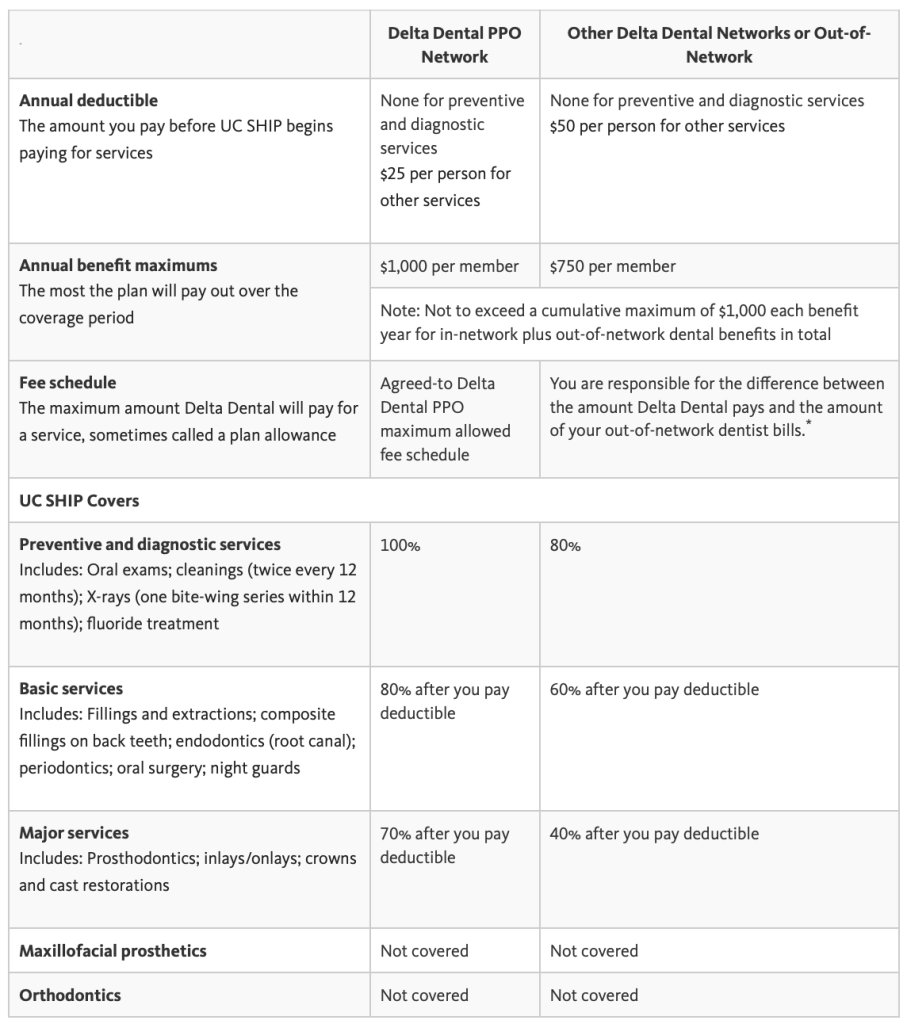
Your dental services don’t necessarily have to be from UCLA, just check whether the dental office you’re interested in accepts Delta Dental PPO to ensure you’re getting the maximum benefits allowed.
Delta Dental has a great mobile application that filters doctors who accept our insurance + what type of services they offer / prices / locations.
Example: Mouthguard cost ($325) – Insurance covers 80% after deductible ($260) = $65 out of pocket
General Health – Ashe Student Health Center
Visit student health.UCLA.edu for all health service/insurance/coverage related information.
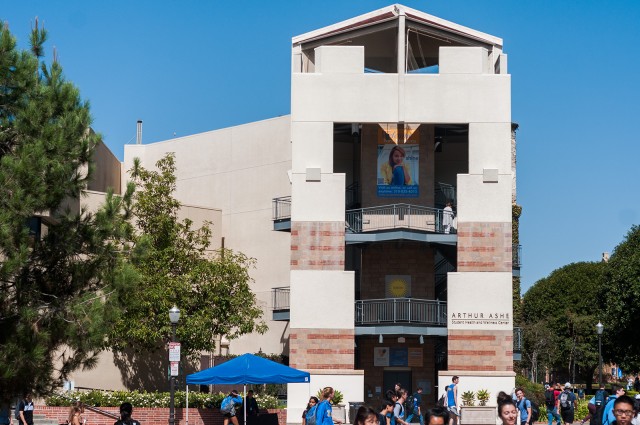
Ashe Student Health Center is our on-campus general hospital/clinic. It’s connected to the right of Wooden gym and right across the plaza from the UCLA store.
Check out what services they offer, you might be surprised! But if there’s an issue that requires more expertise/equipment than is available here (cardiologist, ultrasound, MRI, etc), they will refer you to a specialist. You typically must receive a referral before making an appointment with a specialist if you want coverage (~$25 specialist visit)
Check even if you don’t have UCSHIP! You want to know what to expect if you need some ASAP help from Ashe (FYI: Just $12 for an office visit / ASAP clinic!)
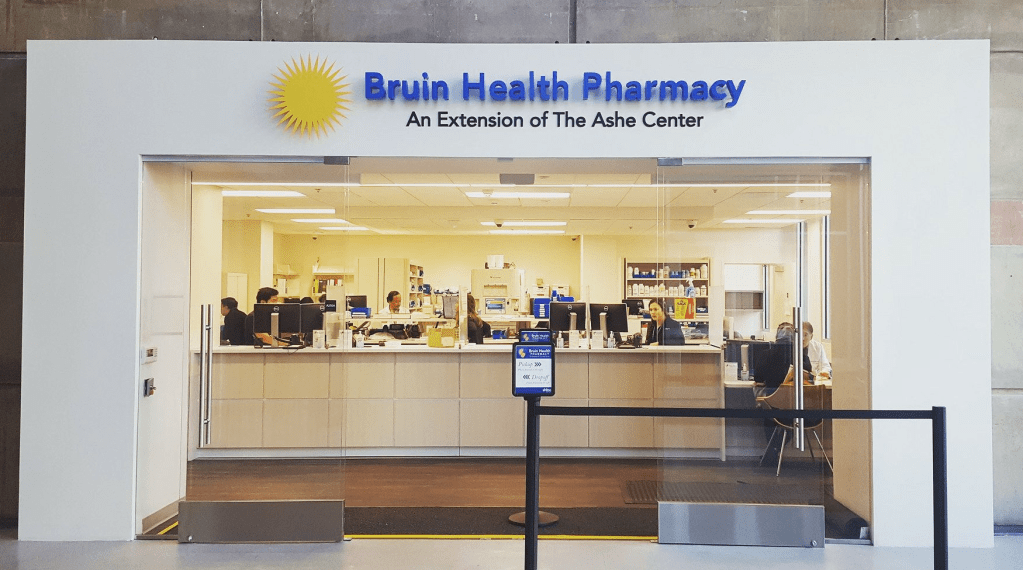
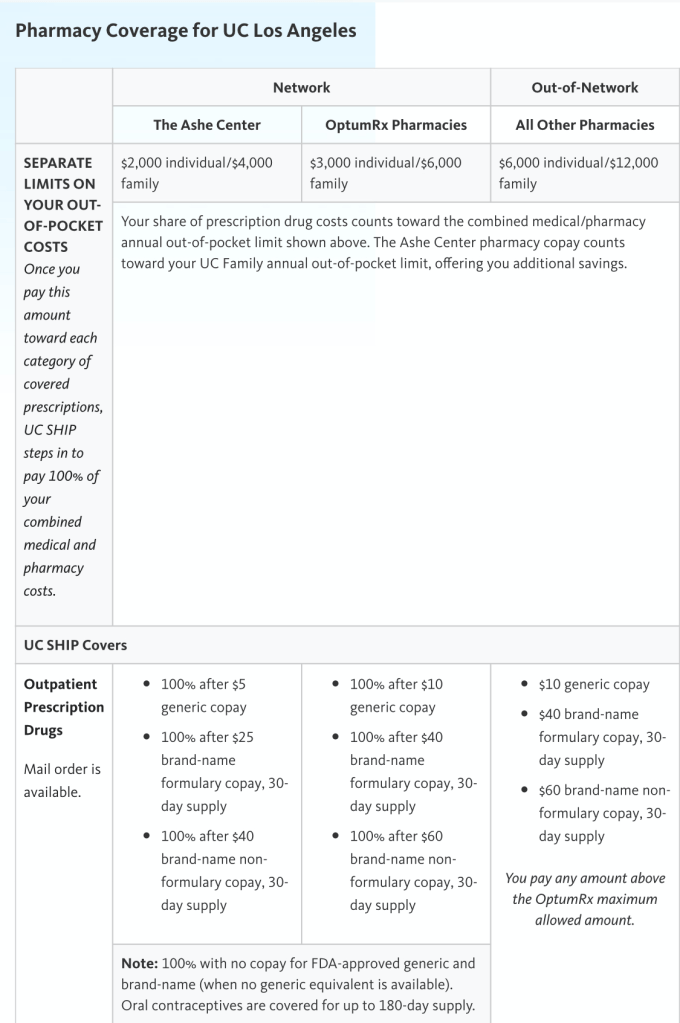
Bruin pharmacy is on A-level of Ackerman Union (floor above UCLA store). They only accept UCSHIP. If you’re prescribed medication, unless otherwise specified, you only pay $5 out of pocket for each!
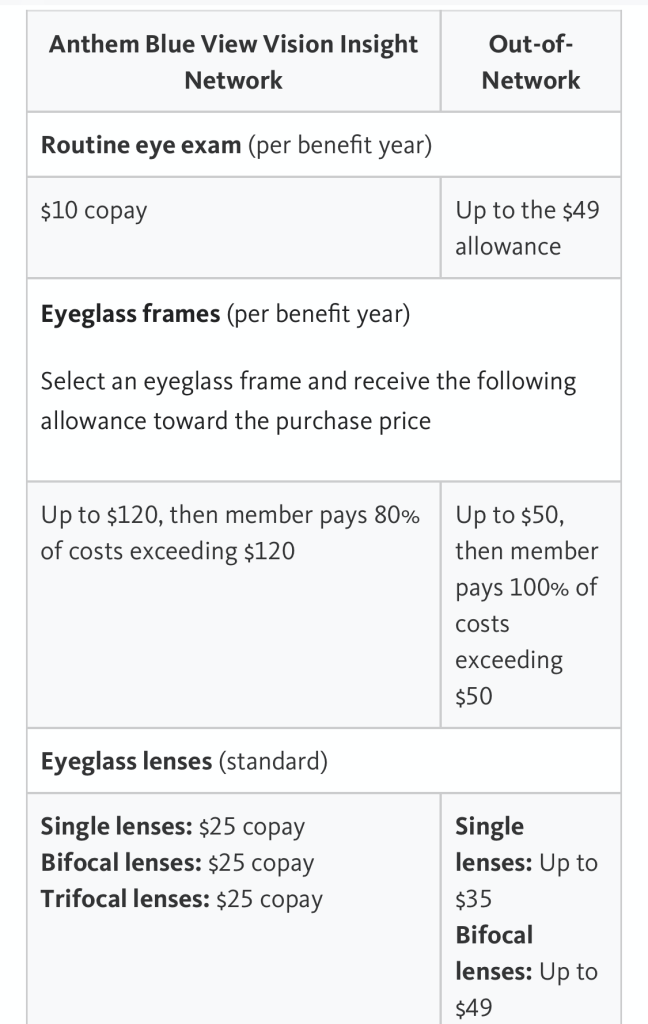
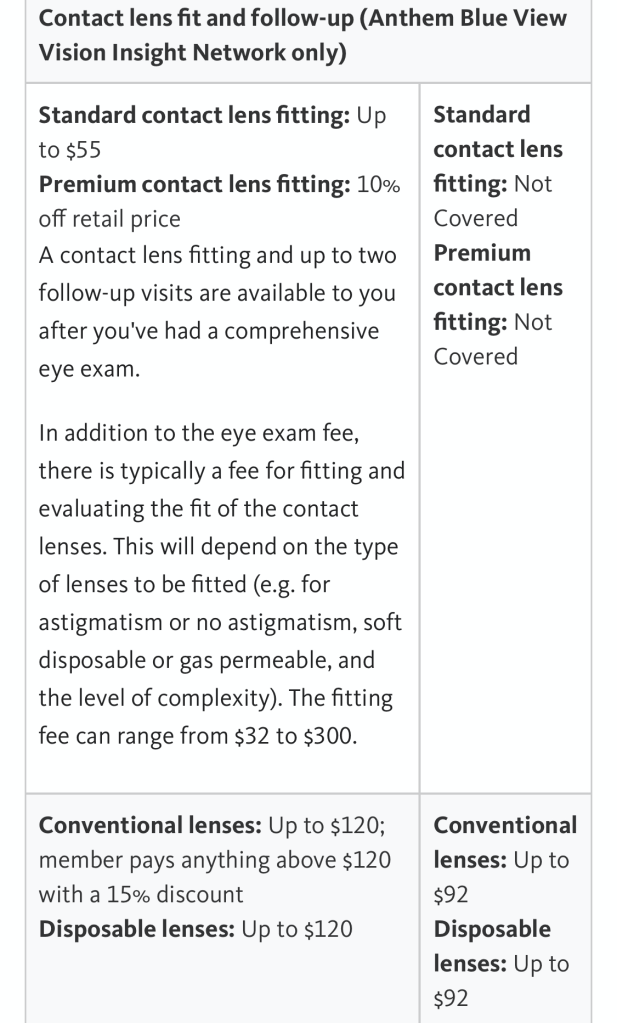
Optometry – Anthem Blue / U-See-LA
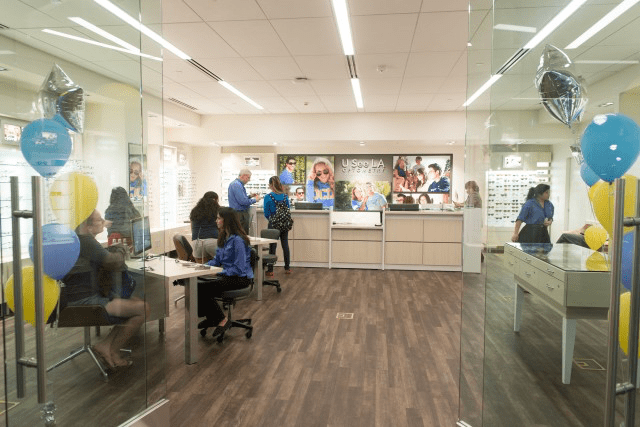
U-See-LA is our on-campus optometry office! It’s on B-Level of Ackerman inside the UCLA Store. Plan in advance! Personally, both my appointments had to be scheduled around a month away due to availability.
Similarly with your dental coverage, you can get these services at other offices for the same benefits if they accept what is offered by UCSHIP/Anthem Blue.
** The information on here is based on my current understanding and what I was personally able to gather from various trusted UCLA sources. I’m not a professional and anything on here is subject to change. Photos have been linked to where I found them from! **
I’m going to a later session; Am I not going to get classes because of this?? No! Classes reserved for the purposes of orientation are generally distributed evenly between each session. There is no advantage in going to an earlier session for this reason.
Who will be in my group? You will be led by your New Student Advisor and your group should consist of around 9 students total if you’re a freshman and around 6 if you’re a transfer. Generally, other students in your group will be in the same or similar majors, but this can vary.
What’s a New Student Advisor? New Student Advisors (NSA) are current or recently graduated students who are trained extensively both to advise you with academics and be your peer mentor. You will be receiving guidance and instructions from your NSA throughout the orientation session and they will make time to meet with you individually to plan out your academics and answer more of your personal questions as well. NSAs and students are assigned to each other, and you’ll know who yours is once you check in on day 1
How will I know where I’m supposed to go or when I have to be somewhere? There’s a lot of scheduled events at orientation to keep track of, but you will receive a session schedule booklet during check in with details about all the different events and activities. Your New Student Advisor will also be reminding you about where and when to meet throughout the session. Having google maps on your phone would be handy; most locations/buildings are available to search directions for!
MyUCLA says I have a “Hold” on my account… How will this affect me? Please let your New Student Advisor or the Orientation staff know that you have a hold! It is likely to block you from enrolling, but the office can attempt to “delay” your hold so that its restrictions are postponed to after our enrollment period at orientation and you can deal with it later
What options are available for students with a food sensitivity/allergy? The student should let the orientation staff know ahead of their orientation session of what dietary restrictions they have so that the staff can accommodate properly on the day of. There are gluten free and dairy free options available for a variety of food, but these must be asked for so they aren’t taken from those without restrictions.
Ah, the Degree Audit Report– also fondly known as DARS! This resource is basically a counselor you can access at any time. Go ahead and bookmark DARS on your computer now!: dars.ucla.edu
I’ll start with a guide on how to access your DARS and then show you which parts you should focus on.
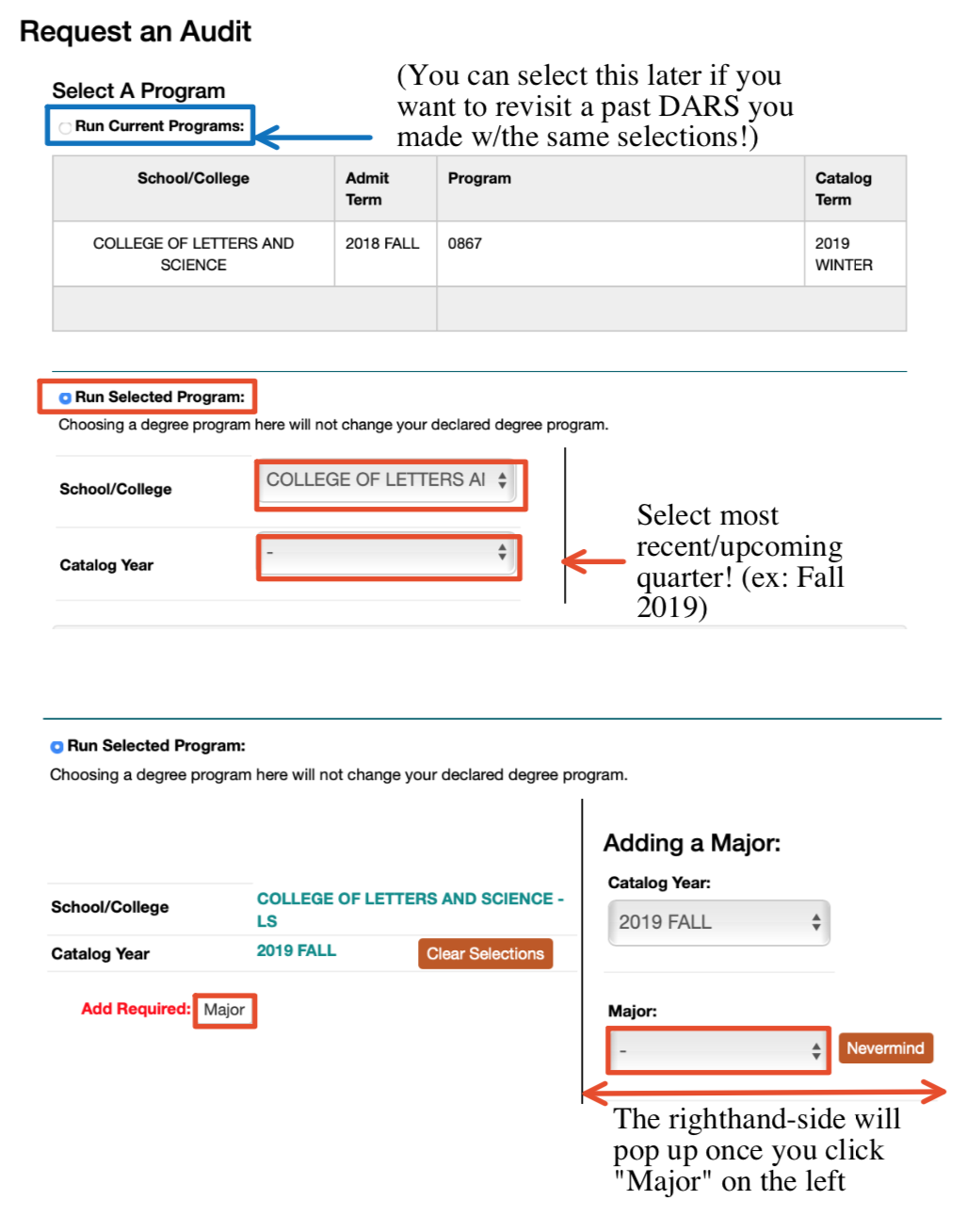
Access your MyUCLA account. Select “Academics” tab > Under “Academic Profile” Column >> Degree Progress/Audit Report
2. Press Run Audit and you should see the page above
3. Check “Run Selected Program” to start a new DARS (You can also click “View” next to a previously run audit if the information is recent enough! After we run our new audit, you’ll see it as an option to view once you visit dars.ucla.edu again)
4. For School/College, use the dropdown menu to select your school. Most majors are a part of the College of Letters and Science 5. For Catalog year, use the dropdown menu to select the most current / upcoming quarter
6. Once you select all the above options, A red “Add Required” will pop up with “Major” next to it. Click on the “Major” button and choose your major from the dropdown menu that will appear right after.
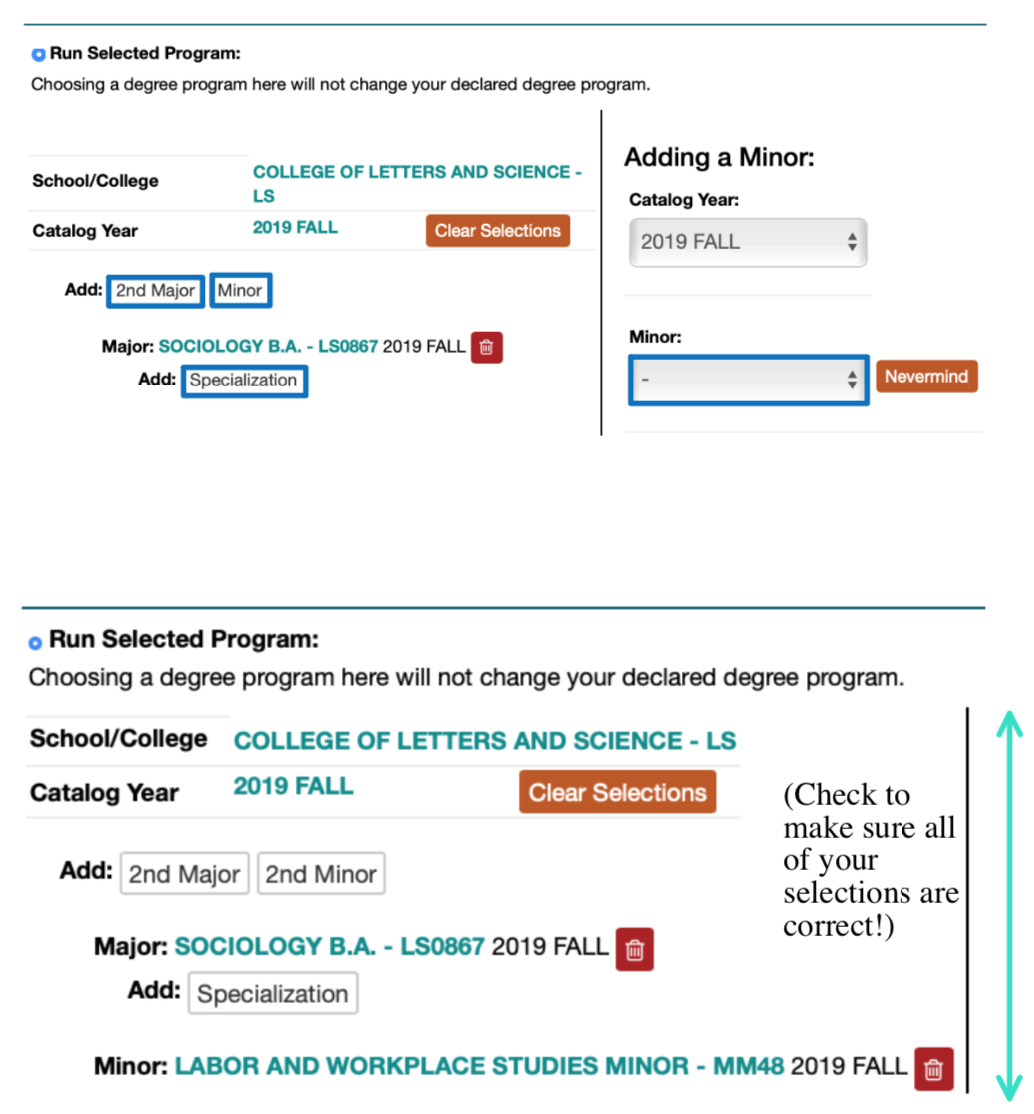
7. Once you’ve selected your major, DAR will give you the option of adding a 2nd major, a minor, or a specialization. If you have one, plan to have one, or just want to see what would be required if you did add something, go ahead and add it in the same way (In the example, I added a Sociology major with a minor!). If you’re good with just your major, skip over and continue on to the next step!
8. Click “Run Audit” button on the very bottom and allow the page to process! You’re all good!
Now what..? What to pay attention to!
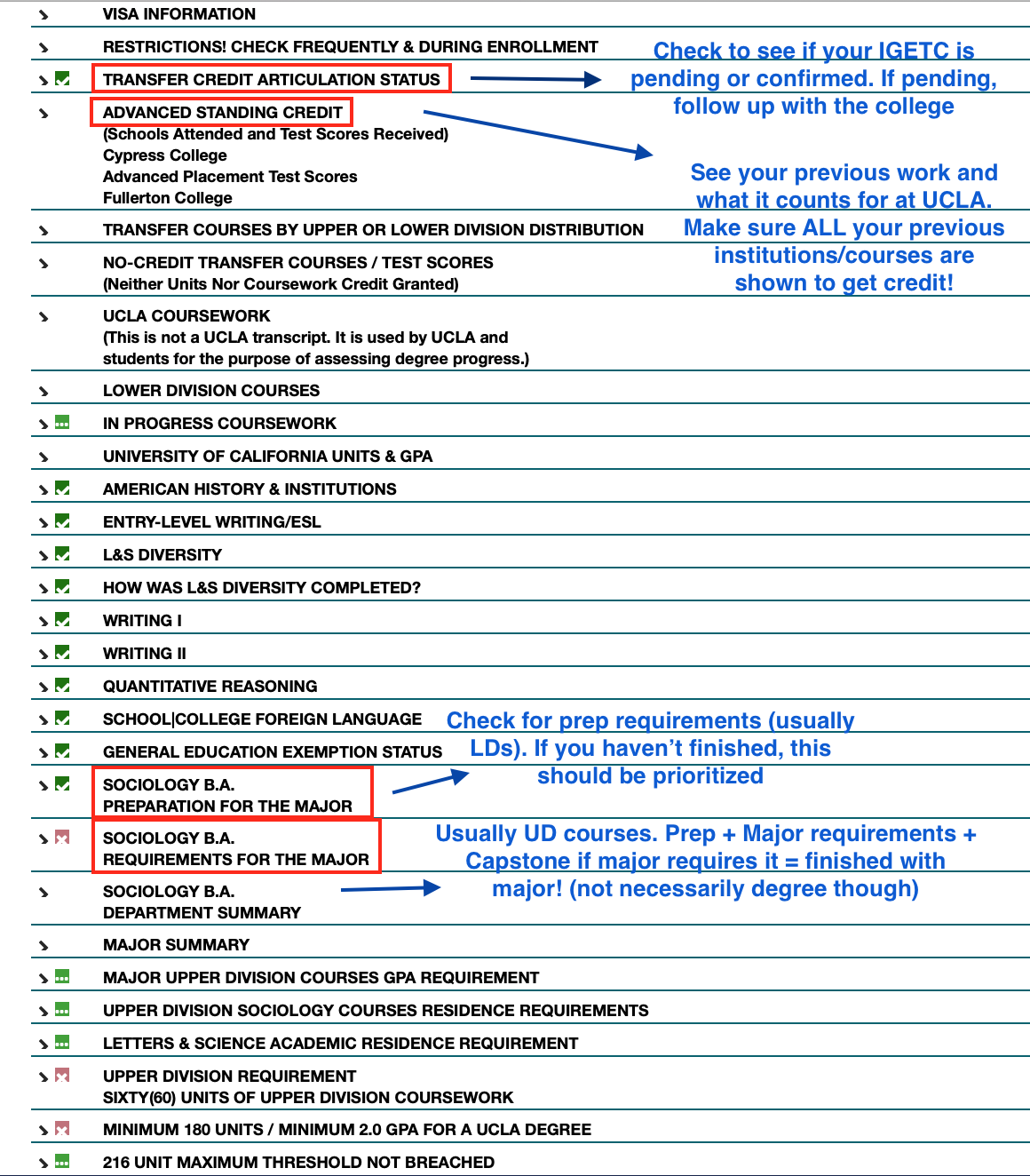
Articulation Status – Expand it and see if your IGETC (if you know you completed it). If it says it’s still pending, check again in the middle of the next quarter to see if it was just taking time. If it’s not there, talk to your academic counselor asap!
Advanced Standing Credit – Check to see whether you’re receiving credit/units from qualifying exam results + transferable college courses you’ve taken elsewhere! The results on the left displays what your exam/course translates to at UCLA.
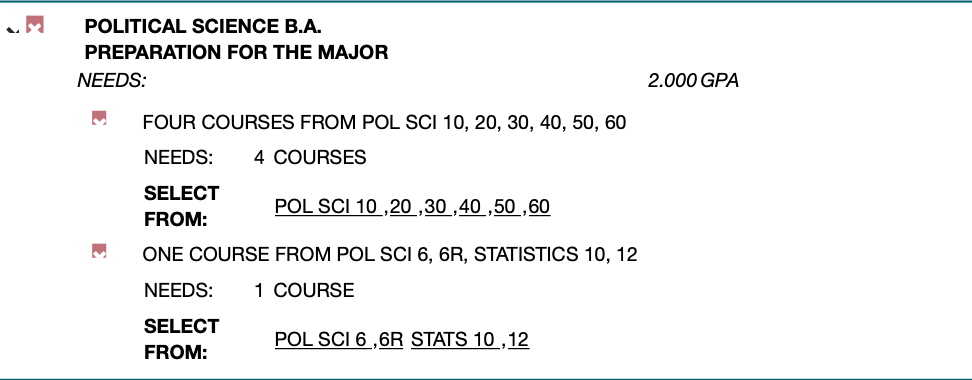
PREPARATION FOR THE MAJOR / MAJOR REQUIREMENTS – This is the other important portion of the DARS. Every class you need to fulfill a major’s preparation / requirements will be displayed (In the above DARS example, the student is a Political Science major. Yours will show the appropriate major).
You use this as a guide to choose classes to enroll in: avoid courses that fulfill requirements you’ve already completed, and choose the ones that will help you progress further in your major!
QUESTIONS?
My DARS isn’t showing the correct major/minor; what should I do? Go back to the beginning of this article and run a new audit with the correct inputs for the major/minor you’re in!
My DARS is showing a red x and says that my IGETC hasn’t been completed? What should I do? At this time, most transfers will see this on their DARS, so don’t worry. If you’re certain that you’ve completed your IGETC/UC Reciprocity (Intersegmental General Education Transfer Contract), you should be fine. My theory is that the system is just overloaded with thousands of transfers and will sort itself out accordingly with records by fall quarter. Make sure to check your DARS in the middle of the quarter just to confirm though!
My DARS isn’t showing credit for a AP/IB exam or the courses I took at another community college under AdvancedStanding Credit… 1. Check to see if you/your school actually sent in the proper exam results + transcripts. If you haven’t, go ahead and send it in officially to UCLA Admission! Check your DARS again later in the quarter to confirm that it’s been received properly. 2. If you’re sure you’ve sent results/transcripts in, check with UCLA Admission to confirm. Otherwise, your exam results may have not counted for anything or your college course(s) may not have been transferable to UCLA.
My college counselor said thatcredit from an exam I took / a class I took should count for a certain requirement, but it’s not showing as fulfilling anything? Check with your counselor / departmental counselor again. If you’ve already spoken to them and they approved it, they may have forgotten to translate it as such OR they may need you to fill out a petition with them to have it count! If this is a college course, be prepared to have that class’ syllabus handy.
Another scenario may be major dependent. For example, the Sociology department will accept a passing AP stats score or a college stats course as fulfilling one major preparation requirement. However, the Political Science department does not accept AP stats and requires the stats course to have included a certain coding component. Check with your major!
I have other specific questions personal to me about my DARS! Meet with your departmental counselor or college counselor to get things sorted.
What do I do with my DARSnow? It’s good practice to run your DARS every once in a while to make sure you’re on track with fulfilling your requirements. I personally plan a visit to my departmental counselor at the end of each quarter so we can go over my DARS together, ask questions, and figure out what I should prioritize when enrolling for the upcoming quarter! I encourage you to do the same.
Copy of all prior college transcripts and exam scores (AP/IB/etc.), or access to them online
Access to your MyUCLA (I know it’s autosaved on your phone/laptop, but you should actually know the username and password)
Water bottle / light snacks
Comfortable clothes / shoes
Reasonable expectations
List of all and any questions/concerns that you would like addressed
New student orientation for transfers lasts an entire day: From check-in by 7-8am until after enrollment around 8:30pm. That being said, there’s just so much information and things you need to take care of during the day that you’ll most likely feel a little rushed if you come in completely unprepared. Make sure to prepare all of the above listed items the night before.
Most of orientation will center around class planning for your fall quarter. Transfers will be enrolling in a total of 3 classes (plus an optional university studies intro for transfers course) during orientation. 1-2 of these should be in your chosen major and at least 1 must be a course outside of your major.
If you would like to come in a little better informed, I recommend you read through the material I’ve prepared about how enrollment works, how to access your degree audit report (which lists exactly which classes you still need to take to fulfill all your major requirements), and how to use Class Planner:
Getting Started Here’s how we get prepared for enrollment:
Figure out what requirements you need to fulfill + What classes would fulfill them through your Degree Audit Report
Find classes that are available in the upcoming quarter that can fulfill those requirements + Interest you
Add these classes to your Class Planner and organize your weekly schedule
Finalize your Class Planner with three courses and three alternative (or backup) classes for each just in case!
What You’ll Need I created a guide for using the Degree Audit Report (DARS) and a guide for using the Class Planner with the schedule of classes (Find a Class and Enroll). I suggest you familiarize yourself and explore before jumping in. Ask your New Student Advisor during orientation if you have any questions or need assistance!
Useful links: General Catalog: Majors – Click on a major to see its requirements General Catalog: Minors – Click on a minor to see its requirements General Catalog: Course Descriptions – Search a course to see what it’s about!
Expectations and Rules
You will be enrolling in 3 courses at orientation; this can be a combination of lower and upper division courses.
Your schedule will generally be 2 LD major prep or UD major requirement courses + 1 LD or UD elective course.
Note: At least one of the courses you select must be outside of your major and this will be enforcedYou can use your elective option to explore a different potential minor by taking one of its required prep courses or just take something that looks fun!
You should be choosing plenty of alternatives / back up classes (At least 3 backup courses for each of the three classes.. ex) if Class 1 and 2 work, but 3 doesn’t, what’s your plan?)
None of the 3 courses in your schedule should share a final exam date
Your classes need to be “Open”, shown with a green padlock. We’re not enrolling in classes that have a waitlist or are closed during orientation
Your classes should have at least or around 15 minutes or more in between them. This is to compensate for walking distance, securing a good seat, and packing/unpacking
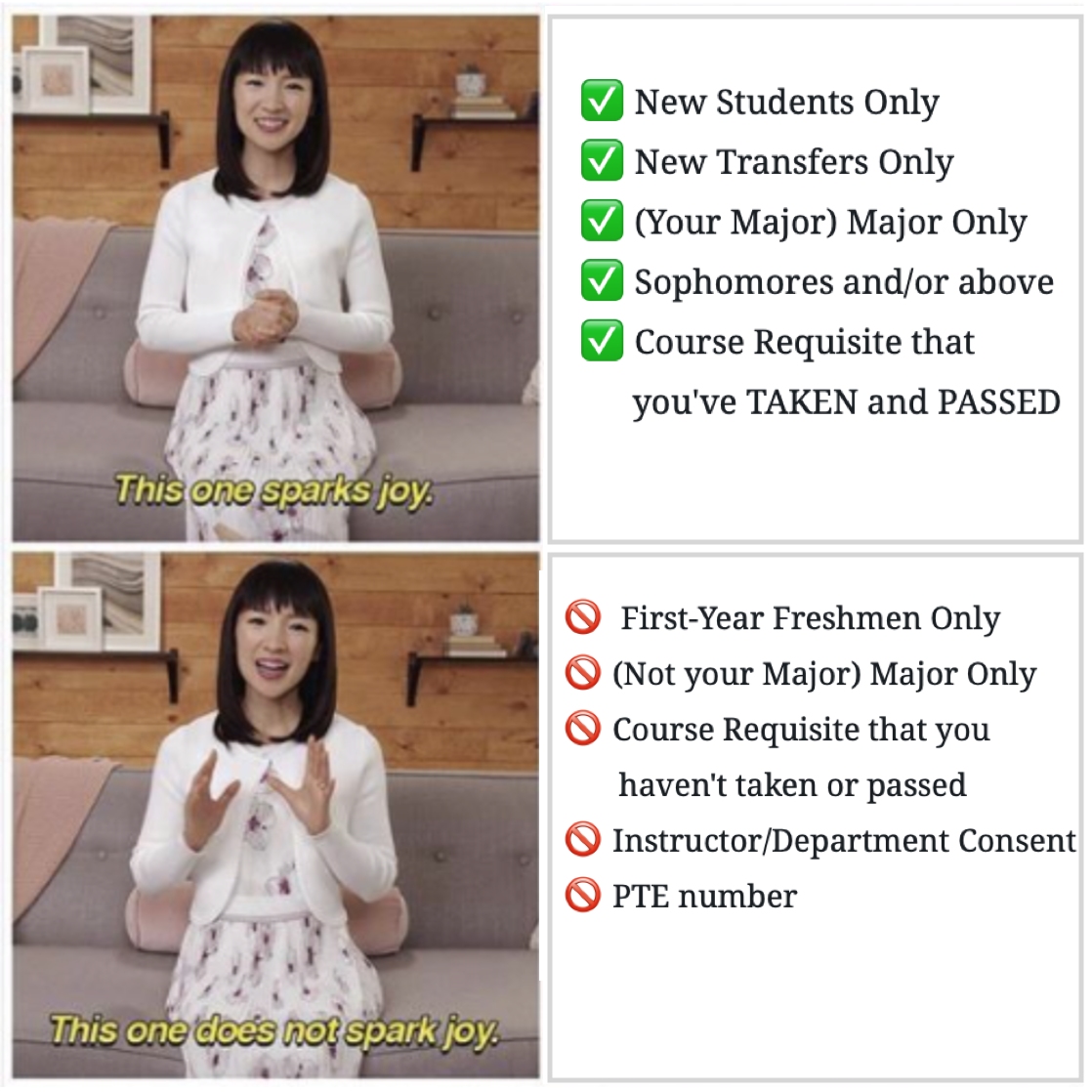
Course Restrictions / Requisites As mentioned in the Class Planner Guide, make sure you are clicking on the orange triangle button next to all courses to check its restrictions and make sure you’re allowed to enroll:
✅ New Students Only ✅ New Transfers Only ✅ (Your Major) Major Only ✅ Sophomores and/or above ✅ Course Requisite that you’ve TAKEN and PASSED
🚫 First-Year Freshmen Only 🚫 (Not your Major) Major Only 🚫 Course Requisite that you haven’t taken or passed 🚫 Instructor/Department Consent 🚫 PTE number
Getting Started Here’s how we get prepared for enrollment:
Figure out what requirements you need to fulfill + What classes would fulfill them through your Degree Audit Report
Find classes that are available in the upcoming quarter that can fulfill those requirements + Interest you
Add these classes to your Class Planner and organize your weekly schedule
Finalize your Class Planner with three courses and three alternative (or backup) classes for each just in case!
What You’ll Need I created a guide for using the Degree Audit Report (DARS) and a guide for using the Class Planner with the schedule of classes (Find a Class and Enroll). Feel free to read through and familiarize yourself before starting. Ask your New Student Advisor if you have any questions or need assistance!
Useful links: General Catalog: Majors – Click on a major to see its requirements General Catalog: Minors – Click on a minor to see its requirements General Catalog: Course Descriptions – Search a course to see what it’s about!
Expectations and Rules
You will be enrolling in 3 lower division courses at orientation.
Your schedule will generally be 1 major prep course + 2 GEs or 2 major prep courses + 1 GE
Note: At least 1/3 of the courses you select must be outside of your major
Another option is to explore a different potential major/minor by taking one of its required prep courses!
You should be choosing plenty of alternatives / back up classes (At least 3 backup courses for each of the three classes.. ex) if Class 1 and 2 work, but 3 doesn’t, what’s my plan? A, B, or C)
None of the 3 courses in your schedule should share a final exam date
Your classes need to be “Open”, shown with a green padlock. We’re not enrolling in classes that have a waitlist or are closed during orientation. (Exception: Ask about Cluster courses or Fiat Lux if full)
Your classes should have at least or around 15 minutes or more in between them. This is to compensate for walking distance, securing a good seat, and packing/unpacking. Make sure to google maps the locations between two classes
Course Restrictions / Requisites As mentioned in the Class Planner Guide, make sure you are clicking on the orange triangle button next to all courses to check its restrictions:
✅ New Students Only ✅ First-Year Freshmen Only ✅ (Your Major) Major Only ✅ Course Requisite that you’ve TAKEN and PASSED
🚫 New Transfers Only 🚫 (Not your Major) Major Only 🚫 Sophomores and/or above 🚫 Course Requisite that you haven’t taken or passed 🚫 Instructor or Department Consent 🚫 PTE number
Laptop / tablet If you don’t have one you can bring, we’ve got computer labs available for use during course planning day 🙂
Chargers and Portable Power Banks for your phone and laptop
Copy of all prior college transcripts and exam scores (AP/IB/etc.), or access to them online
Access to your MyUCLA I know it’s autosaved on your phone/laptop, but you should actually know the username and password)
Water bottle / light snacks Meals are provided throughout orientation, but the schedule dictates when we eat and dining halls close by 8pm! Get those late night hönger snacks in line before it’s too late…!
Prescription/Over the counter medication, glasses/contacts, menstruation/hygiene products
Comfortable clothes / shoes / sunscreen / hat / sunglasses Yes, there will be a lot of walking…and a lot of sun… you’ve been warned!
Reasonable expectations and a good attitude 🙂
List of all and any questions/concerns that you would like addressed It can be a little hard comingup with questions on the spot, but you definitely have at least a few you need answers for! Prepare some in advance and there will be opportunities to ask several departments such as Financial Aid, study abroad, etc
Hand soap You will most likely be staying in a suite with a shared bathroom between two rooms. It’s got toilet paper, but no hand soap.
Warm outerwear / light blanket Yes, this is California, but it can get surprisingly chilly into the evening time! Make sure to bring at least one thing you can wear to stay warm. Blankets are provided in the rooms, but many students have expressed regret at not bringing an additional blanket for more warmth. Something about those ACs…?
Welcome to Bruin Notes! This blog is dedicated to providing incoming UCLA students a practical guide to navigating essential resources and sharing some of my own personal experiences. We all know there are a lot of official resources out there (many of which I will link to!), but it may be a little more digestible in normal student speak! 🙂
Most of the content at the moment is geared towards orientation students, but there are more updates to come in the future!


 Bruin Notes