
Ah, the Degree Audit Report– also fondly known as DARS! This resource is basically a counselor you can access at any time. Go ahead and bookmark DARS on your computer now!: dars.ucla.edu
I’ll start with a guide on how to access your DARS and then show you which parts you should focus on.
What’s the point of DARS right now?: If you’re working on putting your schedule together, DARS is the guide to which classes you should be enrolling in to satisfy unfulfilled requirements!
(I’m familiar with my DARS now and what classes I should be taking!
Continue on to Class Planning!)
Accessing your DARS

- Access your MyUCLA account. Select “Academics” tab > Under “Academic Profile” Column >> Degree Progress/Audit Report
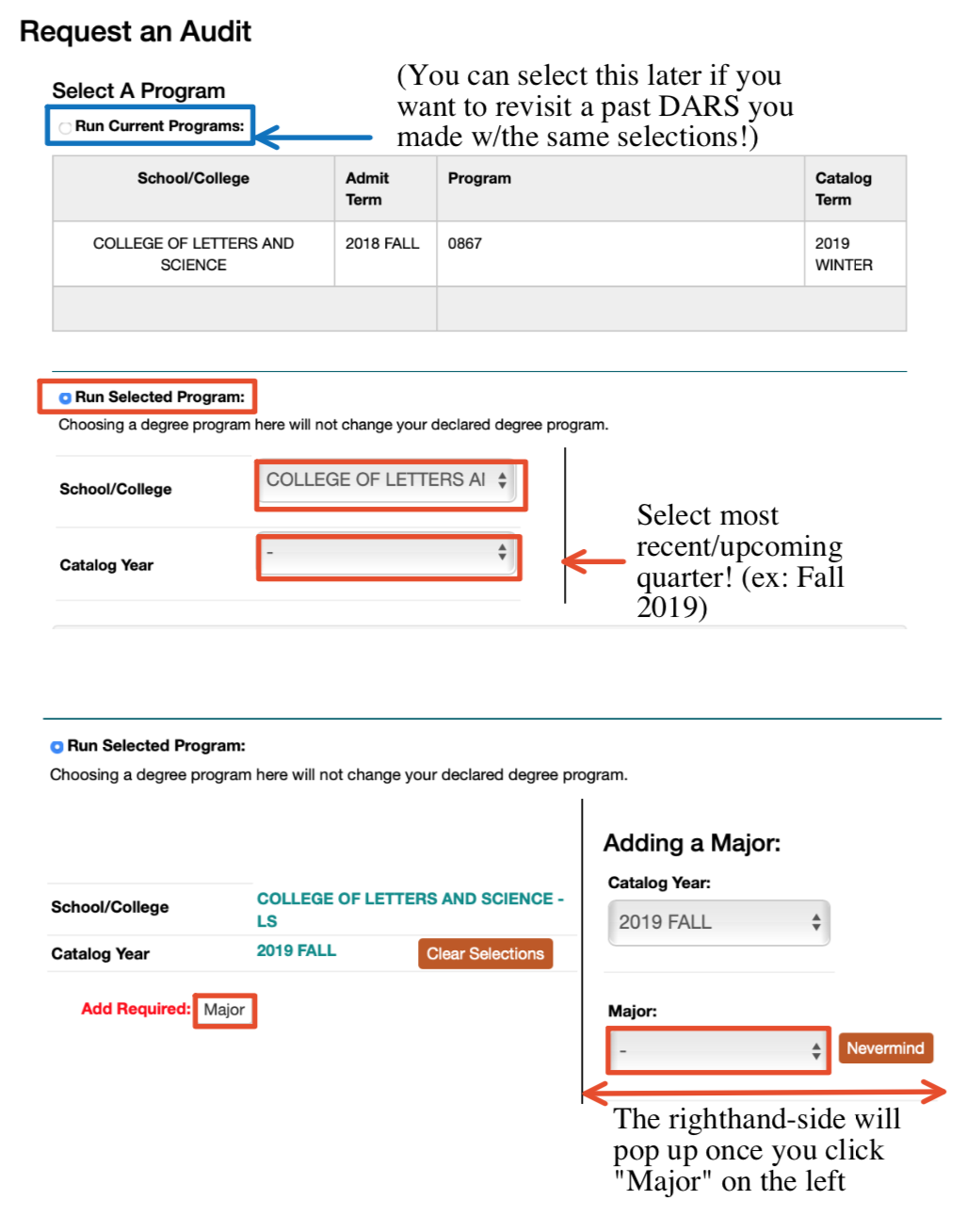
2. Press Run Audit and you should see the page above
3. Check “Run Selected Program” to start a new DARS
(You can also click “View” next to a previously run audit if the information is recent enough! After we run our new audit, you’ll see it as an option to view once you visit dars.ucla.edu again)
4. For School/College, use the dropdown menu to select your school. Most majors are a part of the College of Letters and Science
5. For Catalog year, use the dropdown menu to select the most current / upcoming quarter
6. Once you select all the above options, A red “Add Required” will pop up with “Major” next to it. Click on the “Major” button and choose your major from the dropdown menu that will appear right after.
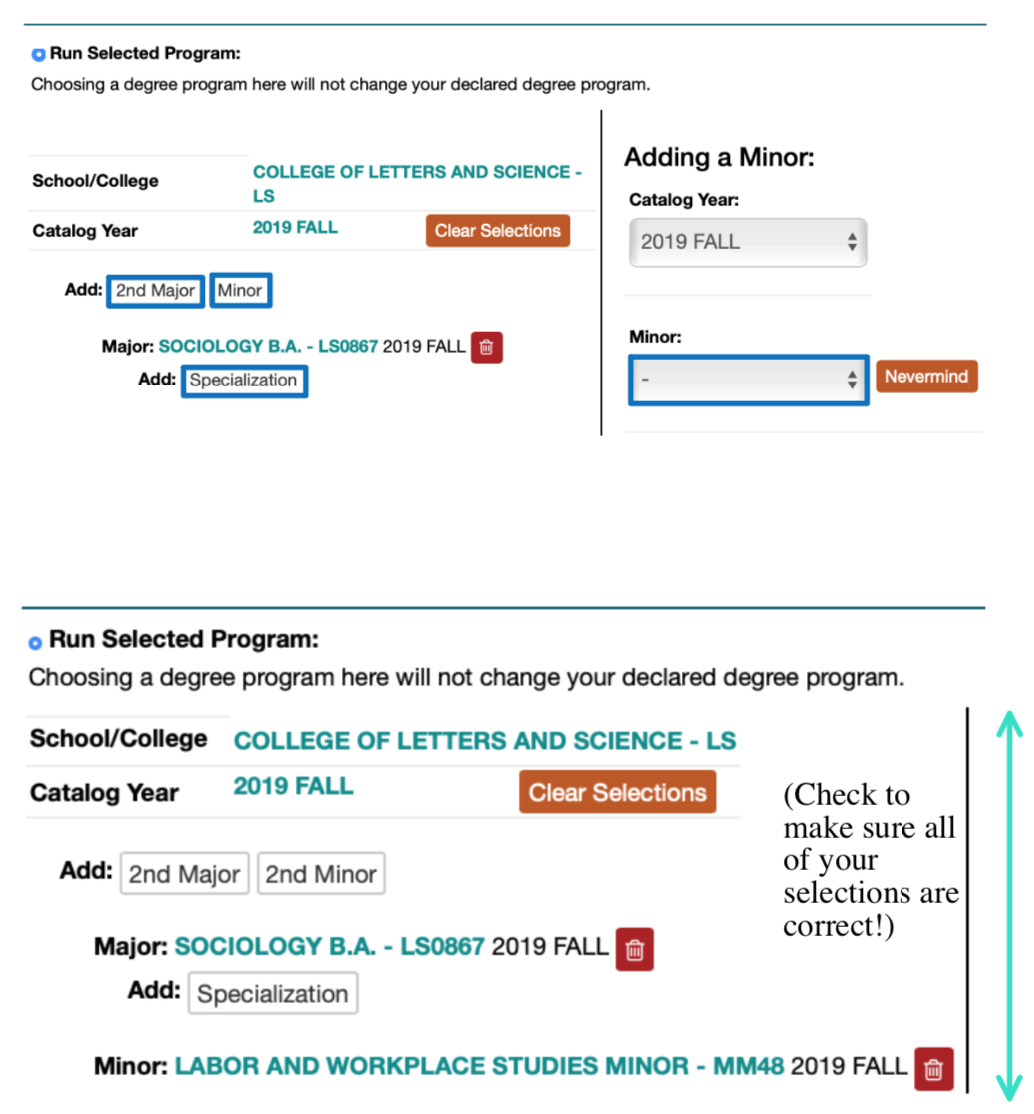
7. Once you’ve selected your major, DAR will give you the option of adding a 2nd major, a minor, or a specialization. If you have one, plan to have one, or just want to see what would be required if you did add something, go ahead and add it in the same way (In the example, I added a Sociology major with a minor!). If you’re good with just your major, skip over and continue on to the next step!
8. Click “Run Audit” button on the very bottom and allow the page to process! You’re all good!
Now what..?
What to pay attention to!
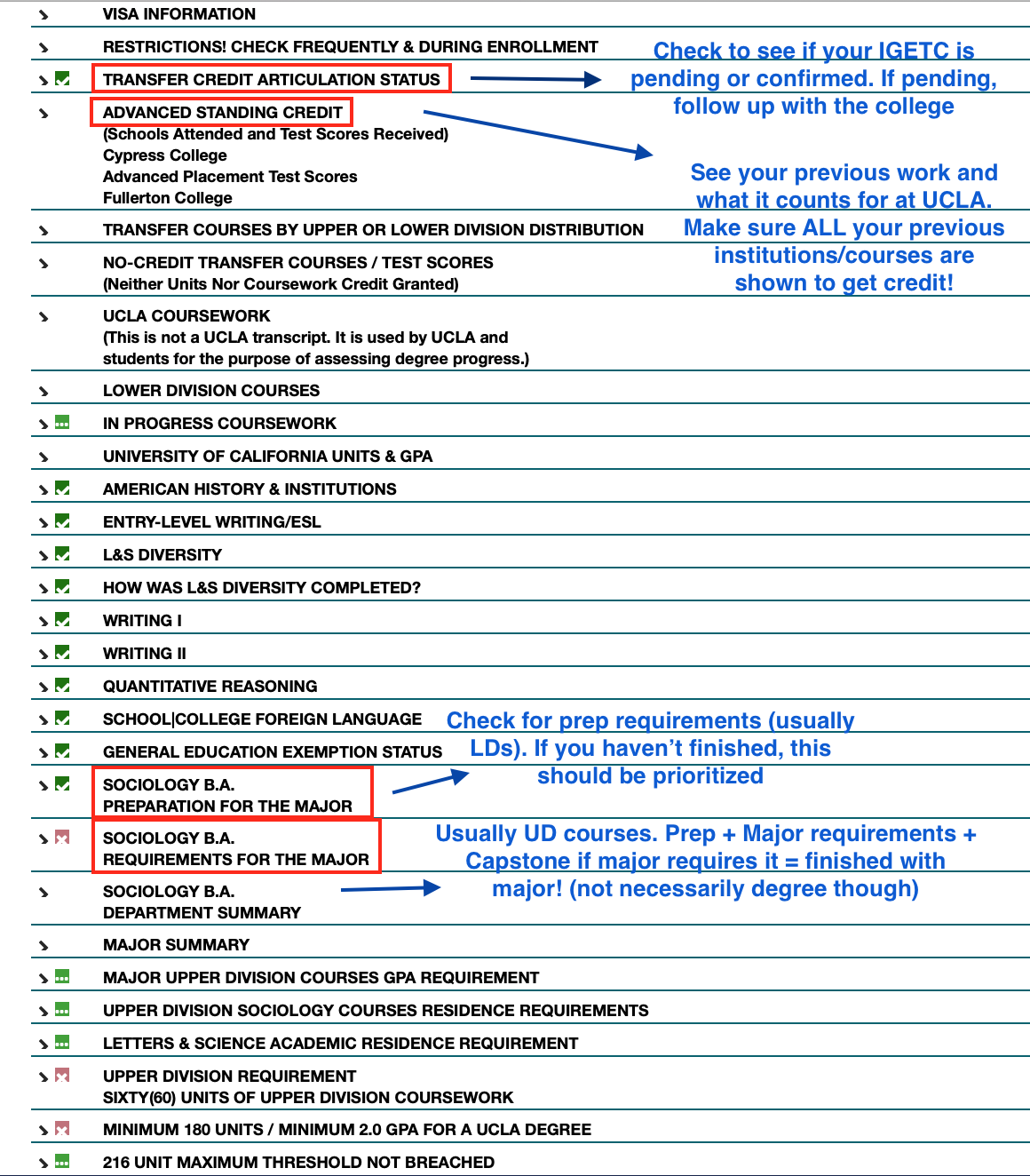
- Articulation Status – Expand it and see if your IGETC (if you know you completed it). If it says it’s still pending, check again in the middle of the next quarter to see if it was just taking time. If it’s not there, talk to your academic counselor asap!
- Advanced Standing Credit – Check to see whether you’re receiving credit/units from qualifying exam results + transferable college courses you’ve taken elsewhere! The results on the left displays what your exam/course translates to at UCLA.
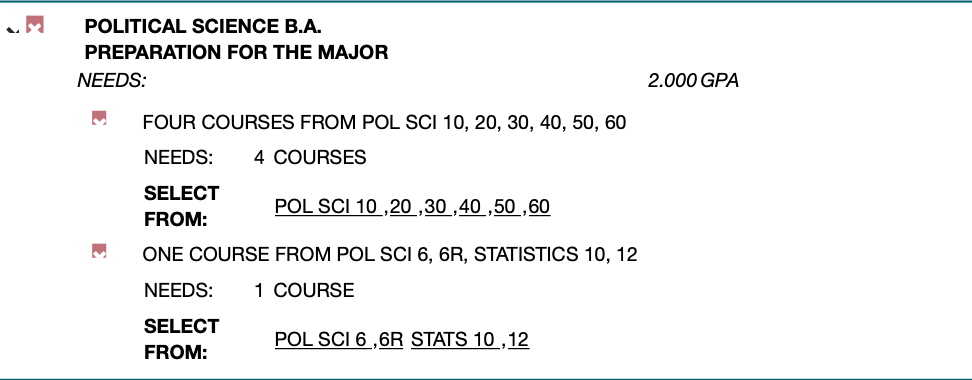
- PREPARATION FOR THE MAJOR / MAJOR REQUIREMENTS – This is the other important portion of the DARS. Every class you need to fulfill a major’s preparation / requirements will be displayed (In the above DARS example, the student is a Political Science major. Yours will show the appropriate major).
- You use this as a guide to choose classes to enroll in: avoid courses that fulfill requirements you’ve already completed, and choose the ones that will help you progress further in your major!
QUESTIONS?
- My DARS isn’t showing the correct major/minor; what should I do?
Go back to the beginning of this article and run a new audit with the correct inputs for the major/minor you’re in! - My DARS is showing a red x and says that my IGETC hasn’t been completed? What should I do?
At this time, most transfers will see this on their DARS, so don’t worry. If you’re certain that you’ve completed your IGETC/UC Reciprocity (Intersegmental General Education Transfer Contract), you should be fine. My theory is that the system is just overloaded with thousands of transfers and will sort itself out accordingly with records by fall quarter. Make sure to check your DARS in the middle of the quarter just to confirm though! - My DARS isn’t showing credit for a AP/IB exam or the courses I took at another community college under Advanced Standing Credit…
1. Check to see if you/your school actually sent in the proper exam results + transcripts. If you haven’t, go ahead and send it in officially to UCLA Admission! Check your DARS again later in the quarter to confirm that it’s been received properly.
2. If you’re sure you’ve sent results/transcripts in, check with UCLA Admission to confirm. Otherwise, your exam results may have not counted for anything or your college course(s) may not have been transferable to UCLA.
- My college counselor said that credit from an exam I took / a class I took should count for a certain requirement, but it’s not showing as fulfilling anything?
Check with your counselor / departmental counselor again. If you’ve already spoken to them and they approved it, they may have forgotten to translate it as such OR they may need you to fill out a petition with them to have it count! If this is a college course, be prepared to have that class’ syllabus handy.
Another scenario may be major dependent. For example, the Sociology department will accept a passing AP stats score or a college stats course as fulfilling one major preparation requirement. However, the Political Science department does not accept AP stats and requires the stats course to have included a certain coding component. Check with your major!
- I have other specific questions personal to me about my DARS!
Meet with your departmental counselor or college counselor to get things sorted. - What do I do with my DARS now?
It’s good practice to run your DARS every once in a while to make sure you’re on track with fulfilling your requirements. I personally plan a visit to my departmental counselor at the end of each quarter so we can go over my DARS together, ask questions, and figure out what I should prioritize when enrolling for the upcoming quarter! I encourage you to do the same.
 Bruin Notes